
Introduction
Rancher Kubernetes Engine (RKE) est une distribution Kubernetes certifiée CNCF qui fonctionne entièrement dans des conteneurs Docker. Elle fonctionne sur des serveurs physiques et virtualisés. RKE résout le problème de la complexité de l'installation, un problème courant dans la communauté Kubernetes.
Avec RKE, l'installation et l'exploitation de Kubernetes sont à la fois simplifiées et facilement automatisées, et elles sont entièrement indépendantes du système d'exploitation et de la plate-forme que vous utilisez. Tant que vous pouvez utiliser une version prise en charge de Docker, vous pouvez déployer et faire fonctionner Kubernetes avec RKE.
Architecture
Distribution linux :
- Ubuntu 20.04 LTS
- CentOS 8
Un serveur de rebond
- bastion : 192.168.1.100
- Contiendra les outils d'administration (kubectl, rke, helm3)
Un cluster kubernetes RKE:
- 3 Master nodes
- master01 : 192.168.1.61
- master02 : 192.168.1.62
- master03 : 192.168.1.63
- 2 Worker nodes
- worker01 : 192.168.1.71
- worker02 : 192.168.1.72
- 1 Worker nodes (Sera ajouté quand le cluster sera opérationnel)
- worker03 : 192.168.1.73
Hardware
- Bastion server
- Ubuntu 20.04 LTS : 2vCPU - 4 Go RAM - 40 GB HDD
- Master nodes
- Ubuntu 20.04 LTS : 4 vCPU - 8 Go RAM - 60 GB HDD
- Ubuntu 20.04 LTS : 4 vCPU - 8 Go RAM - 60 GB HDD
- Ubuntu 20.04 LTS : 4 vCPU - 8 Go RAM - 60 GB HDD
- Worker nodes
- Ubuntu 20.04 LTS : 4 vCPU - 8 Go RAM - 60 GB HDD
- Ubuntu 20.04 LTS : 4 vCPU - 8 Go RAM - 60 GB HDD
- Worker nodes:
- Ubuntu 20.04 LTS : 4 vCPU - 8 Go RAM - 60 GB HDD
Pré-requis
Attention:
Les configurations suivantes devront être réalisé sur tous les noeuds du cluster kubernetes (Master Nodes et Worker Nodes).
Sous Ubuntu 20.04
Système d'exploitation
RKE fonctionne sur presque tous les systèmes d'exploitation Linux avec Docker installé. La plupart du développement et des tests de RKE ont eu lieu sur Ubuntu 16.04. Cependant, certains systèmes d'exploitation ont des restrictions et des exigences spécifiques.
On vérifie que nos systèmes sont à jours.
$ sudo apt update
$ sudo apt upgrade
Désactivation Firewall
Pour le déploiement de notre plateforme Kubernetes, le firewall de la distribution sera désactivé.
Sous Ubuntu 20.04 LTS
$ sudo systemctl disable ufw
$ sudo systemctl stop ufw
Note:
Si le firewall est activé, voir annexe pour l'ouverture des ports TCP/UDP.
- Firewalld TCP ports
- Firewalld UDP ports
Service chrony
Installer le service de temps 'chrony' ou 'ntpd'
$ sudo apt install chrony
[sudo] password for rbouikila:
Lecture des listes de paquets... Fait
Construction de l'arbre des dépendances
Lecture des informations d'état... Fait
Les paquets supplémentaires suivants seront installés :
  libnspr4 libnss3
Les NOUVEAUX paquets suivants seront installés :
  chrony libnspr4 libnss3
0 mis à jour, 3 nouvellement installés, 0 à enlever et 0 non mis à jour.
On redémarre le service
$ sudo systemctl restart chrony
Définir le 'timezone'.
$ sudo timedatectl set-timezone Europe/Paris
Vérification de la timezone.
$ timedatectl
                      Local time: lun. 2020-06-22 00:04:38 CEST
                  Universal time: dim. 2020-06-21 22:04:38 UTC
                        RTC time: dim. 2020-06-21 22:04:39
                       Time zone: Europe/Paris (CEST, +0200)
       System clock synchronized: yes
systemd-timesyncd.service active: yes
                 RTC in local TZ: no
Service SSHD
Le fichier de configuration du système de votre service SSH situé dans “/etc/ssh/sshd_config” doit inclure cette ligne qui permet la redirection TCP :
$ sudo nano /etc/ssh/sshd_config

...
AllowTcpForwarding yes
...
Redémarrer le service sshd.
$ sudo systemctl restart sshd
Module kernel
Les modules de noyau suivants doivent être présents. Lancer la commande ci-dessous pour vérifier que tout les modules nécessaires sont bien chargés.
$ for module in br_netfilter ip6_udp_tunnel ip_set ip_set_hash_ip ip_set_hash_net iptable_filter iptable_nat iptable_mangle iptable_raw nf_conntrack_netlink nf_conntrack nf_defrag_ipv4 nf_nat nfnetlink udp_tunnel veth vxlan x_tables xt_addrtype xt_conntrack xt_comment xt_mark xt_multiport xt_nat xt_recent xt_set  xt_statistic xt_tcpudp;
do
    if ! lsmod | grep -q $module; then
        echo "module $module is not present";
    fi;
done
Pour activer les modules manquants.
$ for module in br_netfilter ip6_udp_tunnel ip_set ip_set_hash_ip ip_set_hash_net iptable_filter iptable_nat iptable_mangle iptable_raw nf_conntrack_netlink nf_conntrack nf_defrag_ipv4 nf_nat nfnetlink udp_tunnel veth vxlan x_tables xt_addrtype xt_conntrack xt_comment xt_mark xt_multiport xt_nat xt_recent xt_set  xt_statistic xt_tcpudp;
do
    if ! lsmod | grep -q $module; then
        sudo modprobe $module
    fi;
done
Configuration du Sysctl
Désactivation de la “swap” et du bridge
$ sudo nano /etc/sysctl.conf
...

# Disable swappiness
vm.swappiness=1
net.bridge.bridge-nf-call-iptables=1
Activation des paramètres à chaud.
$ sudo sysctl -p
Installation de Docker
Mise à jour de l'index des paquets apt et des paquets d'installation pour permettre à apt d'utiliser un dépôt sur HTTPS :
$ sudo apt-get update

$ sudo apt-get install \
    apt-transport-https \
    ca-certificates \
    curl \
    gnupg \
    lsb-release
Ajoutez la clé GPG officielle de Docker :
$ curl -fsSL https://download.docker.com/linux/ubuntu/gpg | sudo gpg --dearmor -o /usr/share/keyrings/docker-archive-keyring.gpg
Utilisez la commande suivante pour configurer le référentiel stable.
$ echo \
  "deb [arch=amd64 signed-by=/usr/share/keyrings/docker-archive-keyring.gpg] https://download.docker.com/linux/ubuntu \
  $(lsb_release -cs) stable" | sudo tee /etc/apt/sources.list.d/docker.list > /dev/null
Mettez à jour l'index des paquets apt, et installez la dernière version de Docker Engine et de containerd, ou passez à l'étape suivante pour installer une version spécifique :
$ sudo apt-get update
$ sudo apt-get install docker-ce docker-ce-cli containerd.io
Une fois l'installation terminée, nous vérifions que le service est bien démarré.
$ systemctl status docker
● docker.service - Docker Application Container Engine
   Loaded: loaded (/lib/systemd/system/docker.service; enabled; vendor preset: enabled)
   Active: active (running) since Sun 2020-06-21 19:47:06 CEST; 4h 20min ago
     Docs: https://docs.docker.com
 Main PID: 8520 (dockerd)
    Tasks: 15
   CGroup: /system.slice/docker.service
           └─8520 /usr/bin/dockerd -H fd:// --containerd=/run/containerd/containerd.sock
On active le service au démarrage du système.
$ sudo systemctl enable --now docker
On vérifie la version de 'Docker'.
$ sudo docker version --format '{{.Server.Version}}'
19.03.11
Sous CentOS 8
Système d'exploitation
RKE fonctionne sur presque tous les systèmes d'exploitation Linux avec Docker installé. La plupart du développement et des tests de RKE ont eu lieu sur Ubuntu 16.04. Cependant, certains systèmes d'exploitation ont des restrictions et des exigences spécifiques.
On vérifie que nos systèmes sont à jours.
# yum update
Désactivation Firewall
Pour le déploiement de notre plateforme Kubernetes, le firewall de la distribution sera désactivé.
$ systemctl disable firewalld
$ systemctl stop firewalld
Note:
Si le firewall est activé, voir annexe pour l'ouverture des ports TCP/UDP.
- Firewalld TCP ports
- Firewalld UDP ports
Service chrony
Installer le service de temps 'chrony' ou 'ntpd'
$ yum install chrony
Lecture des listes de paquets... Fait
Construction de l'arbre des dépendances
Lecture des informations d'état... Fait
Les paquets supplémentaires suivants seront installés :
  libnspr4 libnss3
Les NOUVEAUX paquets suivants seront installés :
  chrony libnspr4 libnss3
0 mis à jour, 3 nouvellement installés, 0 à enlever et 0 non mis à jour.
On redémarre le service
$ systemctl restart chrony
Définir le 'timezone'.
$ timedatectl set-timezone Europe/Paris
Vérification de la timezone.
$ timedatectl
                      Local time: lun. 2020-06-22 00:04:38 CEST
                  Universal time: dim. 2020-06-21 22:04:38 UTC
                        RTC time: dim. 2020-06-21 22:04:39
                       Time zone: Europe/Paris (CEST, +0200)
       System clock synchronized: yes
systemd-timesyncd.service active: yes
                 RTC in local TZ: no
Service SSHD
Le fichier de configuration du système de votre service SSH situé dans “/etc/ssh/sshd_config” doit inclure cette ligne qui permet la redirection TCP :
$ vi /etc/ssh/sshd_config

...
AllowTcpForwarding yes
...
Redémarrer le service sshd.
$ systemctl restart sshd
Module kernel
Les modules de noyau suivants doivent être présents. Lancer la commande ci-dessous pour vérifier que tout les modules nécessaires sont bien chargés.
$ for module in br_netfilter ip6_udp_tunnel ip_set ip_set_hash_ip ip_set_hash_net iptable_filter iptable_nat iptable_mangle iptable_raw nf_conntrack_netlink nf_conntrack nf_conntrack_ipv4   nf_defrag_ipv4 nf_nat nf_nat_ipv4 nfnetlink udp_tunnel veth vxlan x_tables xt_addrtype xt_conntrack xt_comment xt_mark xt_multiport xt_nat xt_recent xt_set  xt_statistic xt_tcpudp;
do
    if ! lsmod | grep -q $module; then
        echo "module $module is not present";
    fi;
done
Pour activer les modules manquants.
$ for module in br_netfilter ip6_udp_tunnel ip_set ip_set_hash_ip ip_set_hash_net iptable_filter iptable_nat iptable_mangle iptable_raw nf_conntrack_netlink nf_conntrack nf_conntrack_ipv4   nf_defrag_ipv4 nf_nat nf_nat_ipv4 nfnetlink udp_tunnel veth vxlan x_tables xt_addrtype xt_conntrack xt_comment xt_mark xt_multiport xt_nat xt_recent xt_set  xt_statistic xt_tcpudp;
do
    if ! lsmod | grep -q $module; then
        sudo modprobe $module
    fi;
done
Utilisateur Linux 'rke'
Création d'un utilisateur Linux 'rke'
$ sudo useradd rke --uid 1250 --home /home/rke/ --create-home --shell /bin/bash
Ajouter l'utilisateur 'rke' au groupe 'Docker'.
$ sudo usermod -aG docker rke
Définir un mot de passe pour l'utilisateur 'rke'.
$ sudo passwd rke
Attribuer les droits 'sudo' à l'utilisateur 'rke'.
$ sudo nano /etc/sudoers.d/rke
rke  ALL=(ALL:ALL) NOPASSWD: ALL
Vérification
$ sudo -l
Matching Defaults entries for rke on worker02:
    env_reset, mail_badpass, secure_path=/usr/local/sbin\:/usr/local/bin\:/usr/sbin\:/usr/bin\:/sbin\:/bin\:/snap/bin

User rke may run the following commands on worker02:
    (ALL : ALL) NOPASSWD: ALL
Transférer la clé SSH sur tous les “nodes” du cluster pour le déploiement
Déploiement de RKE
Pré requis
Le déploiement du cluster kubernetes RKE sera réalisé depuis un serveur central “Bastion”.
Ce bastion disposera des outils nous permettant/simplifiant l'administration du cluster :
- kubectl
- kube-linter
- rke
- helm3
Lien : Serveur Bastion
RKE et cluster.yml
RKE utilise un fichier de configuration au format YAML. De nombreuses options de configuration peuvent être définies dans le fichier cluster.yml.
Ce fichier contient toutes les informations nécessaires à la construction du cluster Kubernetes, comme les informations de connexion aux nœuds, les adresses IP ainsi les rôles à appliquer à chaque nœud, etc.
Toutes les options de configuration se trouvent dans la documentation.
Vous pouvez créer le fichier de configuration du cluster en exécutant “./rke config” et en répondant aux questions.
Note:
Il y a deux façons simples de créer un cluster.yml :
- Utiliser notre cluster.yml minimal et le mettre à jour en fonction du nœud que vous utiliserez.
- En utilisant rke config pour rechercher toutes les informations nécessaires.
rke $ rke config
Note:
Concernant la réponse à la question de créer le fichier de configuration du cluster :
- Les valeurs entre parenthèses, par exemple [22] pour le port SSH, sont des valeurs par défaut et peuvent être utilisées simplement en appuyant sur la touche Entrée.
- La clé privée SSH par défaut fera l'affaire, si vous avez une autre clé, veuillez la changer.
Nous allons générer dans notre exemple un fichier de configuration cluster.yml avec paramètres suivants :
- 3 masters nodes
- 2 workers nodes
- CNI réseaux 'calico'
- Cluster domain : cluster.uat
- utilisateur de déploiement : rke
rke $ ./rke config
[+] Cluster Level SSH Private Key Path [~/.ssh/id_rsa]:
[+] Number of Hosts [1]: 5
[+] SSH Address of host (1) [none]: 192.168.1.61
[+] SSH Port of host (1) [22]:
[+] SSH Private Key Path of host (192.168.1.61) [none]:
[-] You have entered empty SSH key path, trying fetch from SSH key parameter
[+] SSH Private Key of host (192.168.1.61) [none]:
[-] You have entered empty SSH key, defaulting to cluster level SSH key: ~/.ssh/id_rsa
[+] SSH User of host (192.168.1.61) [ubuntu]: rke
[+] Is host (192.168.1.61) a Control Plane host (y/n)? [y]: y
[+] Is host (192.168.1.61) a Worker host (y/n)? [n]: n
[+] Is host (192.168.1.61) an etcd host (y/n)? [n]: y
[+] Override Hostname of host (192.168.1.61) [none]: master01
[+] Internal IP of host (192.168.1.61) [none]:
[+] Docker socket path on host (192.168.1.61) [/var/run/docker.sock]:
[+] SSH Address of host (2) [none]: 192.168.1.62
[+] SSH Port of host (2) [22]:
[+] SSH Private Key Path of host (192.168.1.62) [none]:
[-] You have entered empty SSH key path, trying fetch from SSH key parameter
[+] SSH Private Key of host (192.168.1.62) [none]:
[-] You have entered empty SSH key, defaulting to cluster level SSH key: ~/.ssh/id_rsa
[+] SSH User of host (192.168.1.62) [ubuntu]: rke
[+] Is host (192.168.1.62) a Control Plane host (y/n)? [y]: y
[+] Is host (192.168.1.62) a Worker host (y/n)? [n]: n
[+] Is host (192.168.1.62) an etcd host (y/n)? [n]: y
[+] Override Hostname of host (192.168.1.62) [none]: master02
[+] Internal IP of host (192.168.1.62) [none]:
[+] Docker socket path on host (192.168.1.62) [/var/run/docker.sock]:
[+] SSH Address of host (3) [none]: 192.168.1.63
[+] SSH Port of host (3) [22]:
[+] SSH Private Key Path of host (192.168.1.63) [none]:
[-] You have entered empty SSH key path, trying fetch from SSH key parameter
[+] SSH Private Key of host (192.168.1.63) [none]:
[-] You have entered empty SSH key, defaulting to cluster level SSH key: ~/.ssh/id_rsa
[+] SSH User of host (192.168.1.63) [ubuntu]: rke
[+] Is host (192.168.1.63) a Control Plane host (y/n)? [y]: y
[+] Is host (192.168.1.63) a Worker host (y/n)? [n]: n
[+] Is host (192.168.1.63) an etcd host (y/n)? [n]: y
[+] Override Hostname of host (192.168.1.63) [none]: master03
[+] Internal IP of host (192.168.1.63) [none]:
[+] Docker socket path on host (192.168.1.63) [/var/run/docker.sock]:
[+] SSH Address of host (4) [none]: 192.168.1.71
[+] SSH Port of host (3) [22]:
[+] SSH Private Key Path of host (192.168.1.71) [none]:
[-] You have entered empty SSH key path, trying fetch from SSH key parameter
[+] SSH Private Key of host (192.168.1.71) [none]:
[-] You have entered empty SSH key, defaulting to cluster level SSH key: ~/.ssh/id_rsa
[+] SSH User of host (192.168.1.71) [ubuntu]: rke
[+] Is host (192.168.1.71) a Control Plane host (y/n)? [y]: n
[+] Is host (192.168.1.71) a Worker host (y/n)? [n]: y
[+] Is host (192.168.1.71) an etcd host (y/n)? [n]: n
[+] Override Hostname of host (192.168.1.71) [none]: worker01
[+] Internal IP of host (192.168.1.71) [none]:
[+] Docker socket path on host (192.168.1.71) [/var/run/docker.sock]:
[+] SSH Address of host (5) [none]: 192.168.1.72
[+] SSH Port of host (3) [22]:
[+] SSH Private Key Path of host (192.168.1.72) [none]:
[-] You have entered empty SSH key path, trying fetch from SSH key parameter
[+] SSH Private Key of host (192.168.1.72) [none]:
[-] You have entered empty SSH key, defaulting to cluster level SSH key: ~/.ssh/id_rsa
[+] SSH User of host (192.168.1.72) [ubuntu]: rke
[+] Is host (192.168.1.72) a Control Plane host (y/n)? [y]: n
[+] Is host (192.168.1.72) a Worker host (y/n)? [n]: y
[+] Is host (192.168.1.72) an etcd host (y/n)? [n]: n
[+] Override Hostname of host (192.168.1.72) [none]: worker02
[+] Internal IP of host (192.168.1.72) [none]:
[+] Docker socket path on host (192.168.1.72) [/var/run/docker.sock]:
[+] Network Plugin Type (flannel, calico, weave, canal) [canal]: calico
[+] Authentication Strategy [x509]:
[+] Authorization Mode (rbac, none) [rbac]:
[+] Kubernetes Docker image [rancher/hyperkube:v1.17.6-rancher2]:
[+] Cluster domain [cluster.local]: cluster.uat
[+] Service Cluster IP Range [10.43.0.0/16]:
[+] Enable PodSecurityPolicy [n]:
[+] Cluster Network CIDR [10.42.0.0/16]:
[+] Cluster DNS Service IP [10.43.0.10]:
[+] Add addon manifest URLs or YAML files [no]:
Lorsque l'on fini de répondre aux questions, le fichier cluster.yml sera créé dans le même répertoire que celui où RKE a été exécuté :
rke $ ls -al
-rw-r----- 1 rke  rke      4242 Jun 22 00:55 cluster.yml
Installation de RKE
Après avoir généré le fichier de configuration “cluster.yml”, vous êtes maintenant prêt à construire votre cluster Kubernetes.
Cela peut se faire en lançant simplement la commande rke up.
Avant d'exécuter la commande, assurez-vous que les ports nécessaires sont ouverts entre le bastion et les nœuds, et entre chacun des nœuds.
Vous pouvez maintenant construire votre cluster en lancant la commande rke up.
rke $ rke up

INFO[0000] Running RKE version: v1.0.10
INFO[0000] Initiating Kubernetes cluster
INFO[0000] [certificates] Generating admin certificates and kubeconfig
INFO[0000] Successfully Deployed state file at [./cluster.rkestate]
INFO[0000] Building Kubernetes cluster
INFO[0000] [dialer] Setup tunnel for host [192.168.1.61]
INFO[0000] [dialer] Setup tunnel for host [192.168.1.62]
INFO[0000] [dialer] Setup tunnel for host [192.168.1.63]
INFO[0000] [dialer] Setup tunnel for host [192.168.1.71]
INFO[0000] [dialer] Setup tunnel for host [192.168.1.72]
INFO[0019] [network] No hosts added existing cluster, skipping port check
INFO[0019] [certificates] Deploying kubernetes certificates to Cluster nodes
INFO[0019] Checking if container [cert-deployer] is running on host [192.168.1.72], try #1
INFO[0019] Checking if container [cert-deployer] is running on host [192.168.1.61], try #1
INFO[0019] Checking if container [cert-deployer] is running on host [192.168.1.62], try #1
INFO[0019] Checking if container [cert-deployer] is running on host [192.168.1.63], try #1
INFO[0019] Checking if container [cert-deployer] is running on host [192.168.1.71], try #1
INFO[0019] Image [rancher/rke-tools:v0.1.58] exists on host [192.168.1.72]
INFO[0020] Image [rancher/rke-tools:v0.1.58] exists on host [192.168.1.71]
INFO[0020] Starting container [cert-deployer] on host [192.168.1.72], try #1
INFO[0020] Checking if container [cert-deployer] is running on host [192.168.1.72], try #1
INFO[0022] Image [rancher/rke-tools:v0.1.58] exists on host [192.168.1.61]
INFO[0022] Image [rancher/rke-tools:v0.1.58] exists on host [192.168.1.62]
INFO[0022] Image [rancher/rke-tools:v0.1.58] exists on host [192.168.1.63]
INFO[0025] Checking if container [cert-deployer] is running on host [192.168.1.72], try #1
INFO[0025] Removing container [cert-deployer] on host [192.168.1.72], try #1
INFO[0028] Starting container [cert-deployer] on host [192.168.1.71], try #1
INFO[0029] Starting container [cert-deployer] on host [192.168.1.61], try #1
INFO[0034] Starting container [cert-deployer] on host [192.168.1.62], try #1
INFO[0036] Checking if container [cert-deployer] is running on host [192.168.1.71], try #1
INFO[0036] Checking if container [cert-deployer] is running on host [192.168.1.61], try #1
INFO[0041] Checking if container [cert-deployer] is running on host [192.168.1.71], try #1
INFO[0042] Checking if container [cert-deployer] is running on host [192.168.1.61], try #1
INFO[0044] Checking if container [cert-deployer] is running on host [192.168.1.62], try #1
INFO[0046] Checking if container [cert-deployer] is running on host [192.168.1.71], try #1
INFO[0048] Checking if container [cert-deployer] is running on host [192.168.1.61], try #1
INFO[0049] Removing container [cert-deployer] on host [192.168.1.61], try #1
INFO[0050] Checking if container [cert-deployer] is running on host [192.168.1.62], try #1
INFO[0051] Checking if container [cert-deployer] is running on host [192.168.1.71], try #1
INFO[0055] Checking if container [cert-deployer] is running on host [192.168.1.62], try #1
INFO[0055] Removing container [cert-deployer] on host [192.168.1.62], try #1
INFO[0056] Checking if container [cert-deployer] is running on host [192.168.1.71], try #1
INFO[0056] Removing container [cert-deployer] on host [192.168.1.71], try #1
INFO[0069] Starting container [cert-deployer] on host [192.168.1.63], try #1
INFO[0078] Checking if container [cert-deployer] is running on host [192.168.1.63], try #1
INFO[0083] Checking if container [cert-deployer] is running on host [192.168.1.63], try #1
INFO[0088] Checking if container [cert-deployer] is running on host [192.168.1.63], try #1
INFO[0093] Checking if container [cert-deployer] is running on host [192.168.1.63], try #1
INFO[0093] Removing container [cert-deployer] on host [192.168.1.63], try #1
INFO[0096] [reconcile] Rebuilding and updating local kube config
INFO[0096] Successfully Deployed local admin kubeconfig at [./kube_config_cluster.yml]
INFO[0097] [reconcile] host [192.168.1.61] is active master on the cluster
INFO[0097] [certificates] Successfully deployed kubernetes certificates to Cluster nodes
INFO[0097] [reconcile] Reconciling cluster state
INFO[0097] [reconcile] Check etcd hosts to be deleted
INFO[0097] [reconcile] Check etcd hosts to be added
INFO[0097] [reconcile] Rebuilding and updating local kube config
INFO[0097] Successfully Deployed local admin kubeconfig at [./kube_config_cluster.yml]
INFO[0097] [reconcile] host [192.168.1.61] is active master on the cluster
INFO[0097] [reconcile] Reconciled cluster state successfully
INFO[0097] Pre-pulling kubernetes images
INFO[0097] Image [rancher/hyperkube:v1.17.6-rancher2] exists on host [192.168.1.63]
INFO[0098] Image [rancher/hyperkube:v1.17.6-rancher2] exists on host [192.168.1.62]
INFO[0098] Image [rancher/hyperkube:v1.17.6-rancher2] exists on host [192.168.1.61]
INFO[0098] Image [rancher/hyperkube:v1.17.6-rancher2] exists on host [192.168.1.71]
INFO[0098] Image [rancher/hyperkube:v1.17.6-rancher2] exists on host [192.168.1.72]
INFO[0098] Kubernetes images pulled successfully
INFO[0098] [etcd] Building up etcd plane..
INFO[0098] Image [rancher/rke-tools:v0.1.58] exists on host [192.168.1.61]
INFO[0107] Starting container [etcd-fix-perm] on host [192.168.1.61], try #1
INFO[0116] Successfully started [etcd-fix-perm] container on host [192.168.1.61]
INFO[0116] Waiting for [etcd-fix-perm] container to exit on host [192.168.1.61]
INFO[0116] Waiting for [etcd-fix-perm] container to exit on host [192.168.1.61]
INFO[0117] Removing container [etcd-fix-perm] on host [192.168.1.61], try #1
INFO[0122] [remove/etcd-fix-perm] Successfully removed container on host [192.168.1.61]
INFO[0130] [etcd] Running rolling snapshot container [etcd-snapshot-once] on host [192.168.1.61]
INFO[0131] Removing container [etcd-rolling-snapshots] on host [192.168.1.61], try #1
INFO[0139] [remove/etcd-rolling-snapshots] Successfully removed container on host [192.168.1.61]
INFO[0143] Image [rancher/rke-tools:v0.1.58] exists on host [192.168.1.61]
INFO[0150] Starting container [etcd-rolling-snapshots] on host [192.168.1.61], try #1
INFO[0159] [etcd] Successfully started [etcd-rolling-snapshots] container on host [192.168.1.61]
INFO[0173] Image [rancher/rke-tools:v0.1.58] exists on host [192.168.1.61]
INFO[0180] Starting container [rke-bundle-cert] on host [192.168.1.61], try #1
INFO[0189] [certificates] Successfully started [rke-bundle-cert] container on host [192.168.1.61]
INFO[0189] Waiting for [rke-bundle-cert] container to exit on host [192.168.1.61]
INFO[0196] [certificates] successfully saved certificate bundle [/opt/rke/etcd-snapshots//pki.bundle.tar.gz] on host [192.168.1.61]
INFO[0196] Removing container [rke-bundle-cert] on host [192.168.1.61], try #1
INFO[0198] Image [rancher/rke-tools:v0.1.58] exists on host [192.168.1.61]
INFO[0204] Starting container [rke-log-linker] on host [192.168.1.61], try #1
INFO[0211] [etcd] Successfully started [rke-log-linker] container on host [192.168.1.61]
INFO[0219] Removing container [rke-log-linker] on host [192.168.1.61], try #1
INFO[0221] [remove/rke-log-linker] Successfully removed container on host [192.168.1.61]
INFO[0235] Image [rancher/rke-tools:v0.1.58] exists on host [192.168.1.62]
INFO[0243] Starting container [etcd-fix-perm] on host [192.168.1.62], try #1
INFO[0250] Successfully started [etcd-fix-perm] container on host [192.168.1.62]
INFO[0250] Waiting for [etcd-fix-perm] container to exit on host [192.168.1.62]
INFO[0250] Waiting for [etcd-fix-perm] container to exit on host [192.168.1.62]
INFO[0255] Removing container [etcd-fix-perm] on host [192.168.1.62], try #1
INFO[0257] [remove/etcd-fix-perm] Successfully removed container on host [192.168.1.62]
INFO[0260] [etcd] Running rolling snapshot container [etcd-snapshot-once] on host [192.168.1.62]
INFO[0260] Removing container [etcd-rolling-snapshots] on host [192.168.1.62], try #1
INFO[0267] [remove/etcd-rolling-snapshots] Successfully removed container on host [192.168.1.62]
INFO[0268] Image [rancher/rke-tools:v0.1.58] exists on host [192.168.1.62]
INFO[0274] Starting container [etcd-rolling-snapshots] on host [192.168.1.62], try #1
INFO[0281] [etcd] Successfully started [etcd-rolling-snapshots] container on host [192.168.1.62]
INFO[0288] Image [rancher/rke-tools:v0.1.58] exists on host [192.168.1.62]
INFO[0297] Starting container [rke-bundle-cert] on host [192.168.1.62], try #1
INFO[0304] [certificates] Successfully started [rke-bundle-cert] container on host [192.168.1.62]
INFO[0304] Waiting for [rke-bundle-cert] container to exit on host [192.168.1.62]
INFO[0311] [certificates] successfully saved certificate bundle [/opt/rke/etcd-snapshots//pki.bundle.tar.gz] on host [192.168.1.62]
INFO[0311] Removing container [rke-bundle-cert] on host [192.168.1.62], try #1
INFO[0313] Image [rancher/rke-tools:v0.1.58] exists on host [192.168.1.62]
INFO[0320] Starting container [rke-log-linker] on host [192.168.1.62], try #1
INFO[0324] [etcd] Successfully started [rke-log-linker] container on host [192.168.1.62]
INFO[0330] Removing container [rke-log-linker] on host [192.168.1.62], try #1
INFO[0333] [remove/rke-log-linker] Successfully removed container on host [192.168.1.62]
INFO[0339] Image [rancher/rke-tools:v0.1.58] exists on host [192.168.1.63]
INFO[0344] Starting container [etcd-fix-perm] on host [192.168.1.63], try #1
INFO[0352] Successfully started [etcd-fix-perm] container on host [192.168.1.63]
INFO[0352] Waiting for [etcd-fix-perm] container to exit on host [192.168.1.63]
INFO[0352] Waiting for [etcd-fix-perm] container to exit on host [192.168.1.63]
INFO[0355] Removing container [etcd-fix-perm] on host [192.168.1.63], try #1
INFO[0356] [remove/etcd-fix-perm] Successfully removed container on host [192.168.1.63]
INFO[0356] [etcd] Running rolling snapshot container [etcd-snapshot-once] on host [192.168.1.63]
INFO[0356] Removing container [etcd-rolling-snapshots] on host [192.168.1.63], try #1
INFO[0359] [remove/etcd-rolling-snapshots] Successfully removed container on host [192.168.1.63]
INFO[0359] Image [rancher/rke-tools:v0.1.58] exists on host [192.168.1.63]
INFO[0361] Starting container [etcd-rolling-snapshots] on host [192.168.1.63], try #1
INFO[0364] [etcd] Successfully started [etcd-rolling-snapshots] container on host [192.168.1.63]
INFO[0369] Image [rancher/rke-tools:v0.1.58] exists on host [192.168.1.63]
INFO[0372] Starting container [rke-bundle-cert] on host [192.168.1.63], try #1
INFO[0375] [certificates] Successfully started [rke-bundle-cert] container on host [192.168.1.63]
INFO[0375] Waiting for [rke-bundle-cert] container to exit on host [192.168.1.63]
INFO[0378] [certificates] successfully saved certificate bundle [/opt/rke/etcd-snapshots//pki.bundle.tar.gz] on host [192.168.1.63]
INFO[0378] Removing container [rke-bundle-cert] on host [192.168.1.63], try #1
INFO[0379] Image [rancher/rke-tools:v0.1.58] exists on host [192.168.1.63]
INFO[0381] Starting container [rke-log-linker] on host [192.168.1.63], try #1
INFO[0384] [etcd] Successfully started [rke-log-linker] container on host [192.168.1.63]
INFO[0386] Removing container [rke-log-linker] on host [192.168.1.63], try #1
INFO[0386] [remove/rke-log-linker] Successfully removed container on host [192.168.1.63]
INFO[0386] [etcd] Successfully started etcd plane.. Checking etcd cluster health
INFO[0395] [controlplane] Building up Controller Plane..
INFO[0395] Checking if container [service-sidekick] is running on host [192.168.1.61], try #1
INFO[0395] Checking if container [service-sidekick] is running on host [192.168.1.62], try #1
INFO[0395] Checking if container [service-sidekick] is running on host [192.168.1.63], try #1
INFO[0395] [sidekick] Sidekick container already created on host [192.168.1.63]
INFO[0395] [healthcheck] Start Healthcheck on service [kube-apiserver] on host [192.168.1.63]
INFO[0397] [healthcheck] service [kube-apiserver] on host [192.168.1.63] is healthy
INFO[0397] Image [rancher/rke-tools:v0.1.58] exists on host [192.168.1.63]
INFO[0399] Starting container [rke-log-linker] on host [192.168.1.63], try #1
INFO[0402] [controlplane] Successfully started [rke-log-linker] container on host [192.168.1.63]
INFO[0403] [sidekick] Sidekick container already created on host [192.168.1.62]
INFO[0404] Removing container [rke-log-linker] on host [192.168.1.63], try #1
INFO[0405] [sidekick] Sidekick container already created on host [192.168.1.61]
INFO[0405] [remove/rke-log-linker] Successfully removed container on host [192.168.1.63]
INFO[0405] [healthcheck] Start Healthcheck on service [kube-controller-manager] on host [192.168.1.63]
INFO[0406] [healthcheck] service [kube-controller-manager] on host [192.168.1.63] is healthy
INFO[0406] Image [rancher/rke-tools:v0.1.58] exists on host [192.168.1.63]
INFO[0408] [healthcheck] Start Healthcheck on service [kube-apiserver] on host [192.168.1.62]
INFO[0408] Starting container [rke-log-linker] on host [192.168.1.63], try #1
INFO[0408] [healthcheck] Start Healthcheck on service [kube-apiserver] on host [192.168.1.61]
INFO[0412] [controlplane] Successfully started [rke-log-linker] container on host [192.168.1.63]
INFO[0414] Removing container [rke-log-linker] on host [192.168.1.63], try #1
INFO[0414] [remove/rke-log-linker] Successfully removed container on host [192.168.1.63]
INFO[0415] [healthcheck] Start Healthcheck on service [kube-scheduler] on host [192.168.1.63]
INFO[0415] [healthcheck] service [kube-scheduler] on host [192.168.1.63] is healthy
INFO[0415] Image [rancher/rke-tools:v0.1.58] exists on host [192.168.1.63]
INFO[0418] [healthcheck] service [kube-apiserver] on host [192.168.1.61] is healthy
INFO[0418] Starting container [rke-log-linker] on host [192.168.1.63], try #1
INFO[0419] Image [rancher/rke-tools:v0.1.58] exists on host [192.168.1.61]
INFO[0419] [healthcheck] service [kube-apiserver] on host [192.168.1.62] is healthy
INFO[0419] Image [rancher/rke-tools:v0.1.58] exists on host [192.168.1.62]
INFO[0422] [controlplane] Successfully started [rke-log-linker] container on host [192.168.1.63]
INFO[0424] Removing container [rke-log-linker] on host [192.168.1.63], try #1
INFO[0424] [remove/rke-log-linker] Successfully removed container on host [192.168.1.63]
INFO[0428] Starting container [rke-log-linker] on host [192.168.1.62], try #1
INFO[0433] Starting container [rke-log-linker] on host [192.168.1.61], try #1
INFO[0435] [controlplane] Successfully started [rke-log-linker] container on host [192.168.1.62]
INFO[0445] [controlplane] Successfully started [rke-log-linker] container on host [192.168.1.61]
INFO[0455] Removing container [rke-log-linker] on host [192.168.1.61], try #1
INFO[0457] [remove/rke-log-linker] Successfully removed container on host [192.168.1.61]
INFO[0457] [healthcheck] Start Healthcheck on service [kube-controller-manager] on host [192.168.1.61]
INFO[0458] [healthcheck] service [kube-controller-manager] on host [192.168.1.61] is healthy
INFO[0458] Image [rancher/rke-tools:v0.1.58] exists on host [192.168.1.61]
INFO[0459] Removing container [rke-log-linker] on host [192.168.1.62], try #1
INFO[0462] [remove/rke-log-linker] Successfully removed container on host [192.168.1.62]
INFO[0471] Restarting container [kube-controller-manager] on host [192.168.1.62], try #1
INFO[0485] Starting container [rke-log-linker] on host [192.168.1.61], try #1
INFO[0500] [controlplane] Successfully started [rke-log-linker] container on host [192.168.1.61]
INFO[0511] [healthcheck] Start Healthcheck on service [kube-controller-manager] on host [192.168.1.62]
INFO[0511] Removing container [rke-log-linker] on host [192.168.1.61], try #1
INFO[0514] [remove/rke-log-linker] Successfully removed container on host [192.168.1.61]
INFO[0514] [healthcheck] Start Healthcheck on service [kube-scheduler] on host [192.168.1.61]
INFO[0515] [healthcheck] service [kube-scheduler] on host [192.168.1.61] is healthy
INFO[0515] Image [rancher/rke-tools:v0.1.58] exists on host [192.168.1.61]
INFO[0519] [healthcheck] service [kube-controller-manager] on host [192.168.1.62] is healthy
INFO[0519] Image [rancher/rke-tools:v0.1.58] exists on host [192.168.1.62]
INFO[0528] Starting container [rke-log-linker] on host [192.168.1.62], try #1
INFO[0528] Starting container [rke-log-linker] on host [192.168.1.61], try #1
INFO[0540] [controlplane] Successfully started [rke-log-linker] container on host [192.168.1.62]
INFO[0544] [controlplane] Successfully started [rke-log-linker] container on host [192.168.1.61]
INFO[0560] Removing container [rke-log-linker] on host [192.168.1.61], try #1
INFO[0561] Removing container [rke-log-linker] on host [192.168.1.62], try #1
INFO[0563] [remove/rke-log-linker] Successfully removed container on host [192.168.1.61]
INFO[0563] [remove/rke-log-linker] Successfully removed container on host [192.168.1.62]
INFO[0563] [healthcheck] Start Healthcheck on service [kube-scheduler] on host [192.168.1.62]
INFO[0566] [healthcheck] service [kube-scheduler] on host [192.168.1.62] is healthy
INFO[0572] Image [rancher/rke-tools:v0.1.58] exists on host [192.168.1.62]
INFO[0586] Starting container [rke-log-linker] on host [192.168.1.62], try #1
INFO[0595] [controlplane] Successfully started [rke-log-linker] container on host [192.168.1.62]
INFO[0600] Removing container [rke-log-linker] on host [192.168.1.62], try #1
INFO[0601] [remove/rke-log-linker] Successfully removed container on host [192.168.1.62]
INFO[0601] [controlplane] Successfully started Controller Plane..
INFO[0601] [authz] Creating rke-job-deployer ServiceAccount
INFO[0630] [authz] rke-job-deployer ServiceAccount created successfully
INFO[0630] [authz] Creating system:node ClusterRoleBinding
INFO[0632] [authz] system:node ClusterRoleBinding created successfully
INFO[0632] [authz] Creating kube-apiserver proxy ClusterRole and ClusterRoleBinding
INFO[0637] [authz] kube-apiserver proxy ClusterRole and ClusterRoleBinding created successfully
INFO[0637] Successfully Deployed state file at [./cluster.rkestate]
INFO[0637] [state] Saving full cluster state to Kubernetes
INFO[0637] [state] Successfully Saved full cluster state to Kubernetes ConfigMap: cluster-state
INFO[0637] [worker] Building up Worker Plane..
INFO[0637] Checking if container [service-sidekick] is running on host [192.168.1.63], try #1
INFO[0637] Checking if container [service-sidekick] is running on host [192.168.1.61], try #1
INFO[0637] Checking if container [service-sidekick] is running on host [192.168.1.62], try #1
INFO[0638] [sidekick] Sidekick container already created on host [192.168.1.62]
INFO[0638] [healthcheck] Start Healthcheck on service [kubelet] on host [192.168.1.62]
INFO[0638] [healthcheck] service [kubelet] on host [192.168.1.62] is healthy
INFO[0638] Image [rancher/rke-tools:v0.1.58] exists on host [192.168.1.72]
INFO[0638] [sidekick] Sidekick container already created on host [192.168.1.61]
INFO[0638] Image [rancher/rke-tools:v0.1.58] exists on host [192.168.1.62]
INFO[0638] [healthcheck] Start Healthcheck on service [kubelet] on host [192.168.1.61]
INFO[0638] Starting container [rke-log-linker] on host [192.168.1.72], try #1
INFO[0639] [healthcheck] service [kubelet] on host [192.168.1.61] is healthy
INFO[0639] Image [rancher/rke-tools:v0.1.58] exists on host [192.168.1.61]
INFO[0639] [worker] Successfully started [rke-log-linker] container on host [192.168.1.72]
INFO[0639] Removing container [rke-log-linker] on host [192.168.1.72], try #1
INFO[0639] [sidekick] Sidekick container already created on host [192.168.1.63]
INFO[0639] [healthcheck] Start Healthcheck on service [kubelet] on host [192.168.1.63]
INFO[0639] [remove/rke-log-linker] Successfully removed container on host [192.168.1.72]
INFO[0639] Checking if container [service-sidekick] is running on host [192.168.1.72], try #1
INFO[0639] [sidekick] Sidekick container already created on host [192.168.1.72]
INFO[0639] [healthcheck] Start Healthcheck on service [kubelet] on host [192.168.1.72]
INFO[0640] [healthcheck] service [kubelet] on host [192.168.1.72] is healthy
INFO[0640] Image [rancher/rke-tools:v0.1.58] exists on host [192.168.1.72]
INFO[0640] Starting container [rke-log-linker] on host [192.168.1.72], try #1
INFO[0641] Image [rancher/rke-tools:v0.1.58] exists on host [192.168.1.71]
INFO[0641] [worker] Successfully started [rke-log-linker] container on host [192.168.1.72]
INFO[0641] Removing container [rke-log-linker] on host [192.168.1.72], try #1
INFO[0641] [healthcheck] service [kubelet] on host [192.168.1.63] is healthy
INFO[0641] Image [rancher/rke-tools:v0.1.58] exists on host [192.168.1.63]
INFO[0641] [remove/rke-log-linker] Successfully removed container on host [192.168.1.72]
INFO[0641] [healthcheck] Start Healthcheck on service [kube-proxy] on host [192.168.1.72]
INFO[0642] [healthcheck] service [kube-proxy] on host [192.168.1.72] is healthy
INFO[0642] Image [rancher/rke-tools:v0.1.58] exists on host [192.168.1.72]
INFO[0642] Starting container [rke-log-linker] on host [192.168.1.72], try #1
INFO[0643] [worker] Successfully started [rke-log-linker] container on host [192.168.1.72]
INFO[0643] Removing container [rke-log-linker] on host [192.168.1.72], try #1
INFO[0643] [remove/rke-log-linker] Successfully removed container on host [192.168.1.72]
INFO[0645] Starting container [rke-log-linker] on host [192.168.1.71], try #1
INFO[0645] Starting container [rke-log-linker] on host [192.168.1.63], try #1
INFO[0647] Starting container [rke-log-linker] on host [192.168.1.61], try #1
INFO[0650] [worker] Successfully started [rke-log-linker] container on host [192.168.1.71]
INFO[0650] Removing container [rke-log-linker] on host [192.168.1.71], try #1
INFO[0650] [worker] Successfully started [rke-log-linker] container on host [192.168.1.63]
INFO[0653] [worker] Successfully started [rke-log-linker] container on host [192.168.1.61]
INFO[0655] [remove/rke-log-linker] Successfully removed container on host [192.168.1.71]
INFO[0655] Checking if container [service-sidekick] is running on host [192.168.1.71], try #1
INFO[0655] [sidekick] Sidekick container already created on host [192.168.1.71]
INFO[0655] [healthcheck] Start Healthcheck on service [kubelet] on host [192.168.1.71]
INFO[0656] Removing container [rke-log-linker] on host [192.168.1.63], try #1
INFO[0657] [remove/rke-log-linker] Successfully removed container on host [192.168.1.63]
INFO[0657] [healthcheck] Start Healthcheck on service [kube-proxy] on host [192.168.1.63]
INFO[0657] [healthcheck] service [kubelet] on host [192.168.1.71] is healthy
INFO[0657] Image [rancher/rke-tools:v0.1.58] exists on host [192.168.1.71]
INFO[0658] [healthcheck] service [kube-proxy] on host [192.168.1.63] is healthy
INFO[0658] Image [rancher/rke-tools:v0.1.58] exists on host [192.168.1.63]
INFO[0660] Starting container [rke-log-linker] on host [192.168.1.71], try #1
INFO[0660] Removing container [rke-log-linker] on host [192.168.1.61], try #1
INFO[0662] Starting container [rke-log-linker] on host [192.168.1.62], try #1
INFO[0662] [remove/rke-log-linker] Successfully removed container on host [192.168.1.61]
INFO[0662] [healthcheck] Start Healthcheck on service [kube-proxy] on host [192.168.1.61]
INFO[0663] [healthcheck] service [kube-proxy] on host [192.168.1.61] is healthy
INFO[0663] Image [rancher/rke-tools:v0.1.58] exists on host [192.168.1.61]
INFO[0665] Starting container [rke-log-linker] on host [192.168.1.63], try #1
INFO[0666] [worker] Successfully started [rke-log-linker] container on host [192.168.1.71]
INFO[0669] Removing container [rke-log-linker] on host [192.168.1.71], try #1
INFO[0669] [remove/rke-log-linker] Successfully removed container on host [192.168.1.71]
INFO[0669] [healthcheck] Start Healthcheck on service [kube-proxy] on host [192.168.1.71]
INFO[0671] [healthcheck] service [kube-proxy] on host [192.168.1.71] is healthy
INFO[0671] Image [rancher/rke-tools:v0.1.58] exists on host [192.168.1.71]
INFO[0672] [worker] Successfully started [rke-log-linker] container on host [192.168.1.63]
INFO[0674] [worker] Successfully started [rke-log-linker] container on host [192.168.1.62]
INFO[0674] Starting container [rke-log-linker] on host [192.168.1.61], try #1
INFO[0674] Starting container [rke-log-linker] on host [192.168.1.71], try #1
INFO[0679] [worker] Successfully started [rke-log-linker] container on host [192.168.1.71]
INFO[0680] Removing container [rke-log-linker] on host [192.168.1.63], try #1
INFO[0681] [remove/rke-log-linker] Successfully removed container on host [192.168.1.63]
INFO[0682] Removing container [rke-log-linker] on host [192.168.1.71], try #1
INFO[0682] [remove/rke-log-linker] Successfully removed container on host [192.168.1.71]
INFO[0685] Removing container [rke-log-linker] on host [192.168.1.62], try #1
INFO[0685] [worker] Successfully started [rke-log-linker] container on host [192.168.1.61]
INFO[0687] [remove/rke-log-linker] Successfully removed container on host [192.168.1.62]
INFO[0687] [healthcheck] Start Healthcheck on service [kube-proxy] on host [192.168.1.62]
INFO[0688] [healthcheck] service [kube-proxy] on host [192.168.1.62] is healthy
INFO[0688] Image [rancher/rke-tools:v0.1.58] exists on host [192.168.1.62]
INFO[0694] Removing container [rke-log-linker] on host [192.168.1.61], try #1
INFO[0696] [remove/rke-log-linker] Successfully removed container on host [192.168.1.61]
INFO[0699] Starting container [rke-log-linker] on host [192.168.1.62], try #1
INFO[0708] [worker] Successfully started [rke-log-linker] container on host [192.168.1.62]
INFO[0734] Removing container [rke-log-linker] on host [192.168.1.62], try #1
INFO[0737] [remove/rke-log-linker] Successfully removed container on host [192.168.1.62]
INFO[0737] [worker] Successfully started Worker Plane..
INFO[0737] Image [rancher/rke-tools:v0.1.58] exists on host [192.168.1.61]
INFO[0737] Image [rancher/rke-tools:v0.1.58] exists on host [192.168.1.62]
INFO[0737] Image [rancher/rke-tools:v0.1.58] exists on host [192.168.1.72]
INFO[0738] Starting container [rke-log-cleaner] on host [192.168.1.72], try #1
INFO[0738] [cleanup] Successfully started [rke-log-cleaner] container on host [192.168.1.72]
INFO[0738] Removing container [rke-log-cleaner] on host [192.168.1.72], try #1
INFO[0738] [remove/rke-log-cleaner] Successfully removed container on host [192.168.1.72]
INFO[0738] Image [rancher/rke-tools:v0.1.58] exists on host [192.168.1.71]
INFO[0739] Image [rancher/rke-tools:v0.1.58] exists on host [192.168.1.63]
INFO[0742] Starting container [rke-log-cleaner] on host [192.168.1.71], try #1
INFO[0744] Starting container [rke-log-cleaner] on host [192.168.1.61], try #1
INFO[0745] Starting container [rke-log-cleaner] on host [192.168.1.63], try #1
INFO[0746] [cleanup] Successfully started [rke-log-cleaner] container on host [192.168.1.71]
INFO[0749] Removing container [rke-log-cleaner] on host [192.168.1.71], try #1
INFO[0749] [cleanup] Successfully started [rke-log-cleaner] container on host [192.168.1.63]
INFO[0749] [remove/rke-log-cleaner] Successfully removed container on host [192.168.1.71]
INFO[0751] Removing container [rke-log-cleaner] on host [192.168.1.63], try #1
INFO[0752] [remove/rke-log-cleaner] Successfully removed container on host [192.168.1.63]
INFO[0753] [cleanup] Successfully started [rke-log-cleaner] container on host [192.168.1.61]
INFO[0753] Starting container [rke-log-cleaner] on host [192.168.1.62], try #1
INFO[0761] Removing container [rke-log-cleaner] on host [192.168.1.61], try #1
INFO[0762] [remove/rke-log-cleaner] Successfully removed container on host [192.168.1.61]
INFO[0769] [cleanup] Successfully started [rke-log-cleaner] container on host [192.168.1.62]
INFO[0780] Removing container [rke-log-cleaner] on host [192.168.1.62], try #1
INFO[0782] [remove/rke-log-cleaner] Successfully removed container on host [192.168.1.62]
INFO[0782] [sync] Syncing nodes Labels and Taints
INFO[0785] [sync] Successfully synced nodes Labels and Taints
INFO[0785] [network] Setting up network plugin: calico
INFO[0785] [addons] Saving ConfigMap for addon rke-network-plugin to Kubernetes
INFO[0786] [addons] Successfully saved ConfigMap for addon rke-network-plugin to Kubernetes
INFO[0786] [addons] Executing deploy job rke-network-plugin
INFO[0794] [addons] Setting up coredns
INFO[0794] [addons] Saving ConfigMap for addon rke-coredns-addon to Kubernetes
INFO[0796] [addons] Successfully saved ConfigMap for addon rke-coredns-addon to Kubernetes
INFO[0796] [addons] Executing deploy job rke-coredns-addon
INFO[0919] [addons] CoreDNS deployed successfully
INFO[0919] [dns] DNS provider coredns deployed successfully
INFO[0920] [addons] Setting up Metrics Server
INFO[0920] [addons] Saving ConfigMap for addon rke-metrics-addon to Kubernetes
INFO[0921] [addons] Successfully saved ConfigMap for addon rke-metrics-addon to Kubernetes
INFO[0921] [addons] Executing deploy job rke-metrics-addon
INFO[1003] [addons] Metrics Server deployed successfully
INFO[1003] [ingress] Setting up nginx ingress controller
INFO[1003] [addons] Saving ConfigMap for addon rke-ingress-controller to Kubernetes
INFO[1004] [addons] Successfully saved ConfigMap for addon rke-ingress-controller to Kubernetes
INFO[1004] [addons] Executing deploy job rke-ingress-controller
INFO[1101] [ingress] ingress controller nginx deployed successfully
INFO[1101] [addons] Setting up user addons
INFO[1101] [addons] no user addons defined
INFO[1101] Finished building Kubernetes cluster successfully
Connexion au cluster
La connexion/administration du cluster RKE sera réalisé depuis le serveur bastion.
$ export KUBECONFIG=$PWD/kube_config_cluster.yml
Vérifier la version du client/server.
$ kubectl version
Client Version: version.Info{Major:"1", Minor:"18", GitVersion:"v1.18.4", GitCommit:"c96aede7b5205121079932896c4ad89bb93260af", GitTreeState:"clean", BuildDate:"2020-06-17T11:41:22Z", GoVersion:"go1.13.9", Compiler:"gc", Platform:"linux/amd64"}
Server Version: version.Info{Major:"1", Minor:"17", GitVersion:"v1.17.6", GitCommit:"d32e40e20d167e103faf894261614c5b45c44198", GitTreeState:"clean", BuildDate:"2020-05-20T13:08:34Z", GoVersion:"go1.13.9", Compiler:"gc", Platform:"linux/amd64"}
Vérifier l'état des composants.
$ kubectl get cs
NAME                 STATUS    MESSAGE             ERROR
controller-manager   Healthy   ok
scheduler            Healthy   ok
etcd-2               Healthy   {"health":"true"}
etcd-0               Healthy   {"health":"true"}
etcd-1               Healthy   {"health":"true"}
Vérifier l'état des noeuds du cluster kubernetes.
$ kubectl get nodes
NAME       STATUS   ROLES               AGE   VERSION
master01   Ready    controlplane,etcd   53m   v1.17.6
master02   Ready    controlplane,etcd   53m   v1.17.6
master03   Ready    controlplane,etcd   53m   v1.17.6
worker01   Ready    worker              53m   v1.17.6
worker02   Ready    worker              54m   v1.17.6
Vérifier la description d'un noeud kubernetes.
$ kubectl describe nodes master01
ame:               master01.oowy.lan
Roles:              controlplane,etcd
Labels:             beta.kubernetes.io/arch=amd64
                    beta.kubernetes.io/os=linux
                    kubernetes.io/arch=amd64
                    kubernetes.io/hostname=master01.oowy.lan
                    kubernetes.io/os=linux
                    node-role.kubernetes.io/controlplane=true
                    node-role.kubernetes.io/etcd=true
Annotations:        node.alpha.kubernetes.io/ttl: 0
                    projectcalico.org/IPv4Address: 10.75.168.101/24
                    projectcalico.org/IPv4IPIPTunnelAddr: 10.42.189.128
                    rke.cattle.io/external-ip: 10.75.168.101
                    rke.cattle.io/internal-ip: 10.75.168.101
                    volumes.kubernetes.io/controller-managed-attach-detach: true
CreationTimestamp:  Sat, 13 Mar 2021 17:43:29 +0000
Taints:             node-role.kubernetes.io/etcd=true:NoExecute
                    node-role.kubernetes.io/controlplane=true:NoSchedule
Unschedulable:      false
Lease:
  HolderIdentity:  master01.oowy.lan
  AcquireTime:     <unset>
  RenewTime:       Sat, 13 Mar 2021 17:45:50 +0000
Conditions:
  Type                 Status  LastHeartbeatTime                 LastTransitionTime                Reason                       Message
  ----                 ------  -----------------                 ------------------                ------                       -------
  NetworkUnavailable   False   Sat, 13 Mar 2021 17:44:17 +0000   Sat, 13 Mar 2021 17:44:17 +0000   CalicoIsUp                   Calico is running on this node
  MemoryPressure       False   Sat, 13 Mar 2021 17:44:30 +0000   Sat, 13 Mar 2021 17:43:29 +0000   KubeletHasSufficientMemory   kubelet has sufficient memory available
  DiskPressure         False   Sat, 13 Mar 2021 17:44:30 +0000   Sat, 13 Mar 2021 17:43:29 +0000   KubeletHasNoDiskPressure     kubelet has no disk pressure
  PIDPressure          False   Sat, 13 Mar 2021 17:44:30 +0000   Sat, 13 Mar 2021 17:43:29 +0000   KubeletHasSufficientPID      kubelet has sufficient PID available
  Ready                True    Sat, 13 Mar 2021 17:44:30 +0000   Sat, 13 Mar 2021 17:44:10 +0000   KubeletReady                 kubelet is posting ready status
Addresses:
  InternalIP:  10.75.168.101
  Hostname:    master01.oowy.lan
$ kubectl get pods --all-namespaces
NAMESPACE       NAME                                       READY   STATUS      RESTARTS   AGE
ingress-nginx   default-http-backend-67cf578fc4-6vtsq      1/1     Running     0          31m
ingress-nginx   nginx-ingress-controller-lrdc2             1/1     Running     1          31m
ingress-nginx   nginx-ingress-controller-txbks             1/1     Running     0          31m
kube-system     calico-kube-controllers-65996c8f7f-cnzn7   1/1     Running     0          50m
kube-system     calico-node-2z5w9                          1/1     Running     2          50m
kube-system     calico-node-b6crh                          1/1     Running     0          50m
kube-system     calico-node-qvc6f                          1/1     Running     4          50m
kube-system     calico-node-x5t6j                          1/1     Running     4          50m
kube-system     calico-node-xft6m                          1/1     Running     8          50m
kube-system     coredns-7c5566588d-2h8x7                   1/1     Running     0          34m
kube-system     coredns-7c5566588d-p9q2t                   1/1     Running     0          30m
kube-system     coredns-autoscaler-65bfc8d47d-frlnx        1/1     Running     0          34m
kube-system     metrics-server-6b55c64f86-s4ggt            1/1     Running     3          32m
kube-system     rke-coredns-addon-deploy-job-2k5rg         0/1     Completed   0          35m
kube-system     rke-ingress-controller-deploy-job-qmrm9    0/1     Completed   0          32m
kube-system     rke-metrics-addon-deploy-job-8z9gn         0/1     Completed   0          33m
kube-system     rke-network-plugin-deploy-job-ffjdn        0/1     Completed   0          52m
Master nodes en HA
Maintenant que notre cluster est opérationnel, nous allons pouvoir aborder la partie de mise en haute disponibilité des masters nodes.
Le but est de mettre en place une VIP (IP Virtuelle) qui nous permettra de load-balancer vers les 3 masters nodes.
Si l'on vérifie le contenu de notre fichier de configuration “kube_config_cluster.yml”, on peut se rendre compte que celui-ci ne point que vers un seul master node.
Schéma Architecture
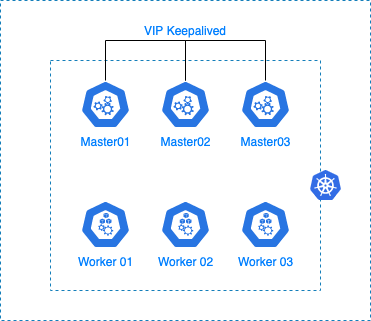
Installation de keepalived
Nous allons installer le package “keepalived” sur nos trois masters nodes.
Sous Ubuntu
$ sudo apt install keepalived
Sous CentOS
$ sudo yum install keepalived
Configuration de keepalived
Nous allons configurer le service keepalived sur nos 3 masters nodes de la manière suivantes :
$ sudo nano /etc/keepalived/keepalived.conf

! Configuration File for keepalived

global_defs {
   notification_email {
     sysadmin@oowy.fr
     support@oowy.fr
   }
   notification_email_from noreply@oowy.fr
   smtp_server localhost
   smtp_connect_timeout 30
}

vrrp_instance VI_1 {
    state MASTER
    interface enp0s3
    virtual_router_id 51
    priority 101
    advert_int 1

    authentication {
        auth_type PASS
        auth_pass ToTO123456
    }

    virtual_ipaddress {
        10.75.168.99/32
    }

}
- enp0s3 : Nom de l'interface réseaux du serveur
- 192.168.1.XX : VIP partagé entre les noeuds
Paramétrage de RKE
Maintenant que nous avons configuré keepalived sur nos masters nodes, nous allons configurer notre cluster kubernetes en modifiant le fichier de configuration “cluster.yml”.
Pour cela, éditer le fichier cluster.yml en ajoutant l'IP de la VIP ainsi que l'URL dans la section authentication.
$ nano cluster.yml
...
authentication:
  strategy: x509
  sans:
    - "<ADRESSE_VIP>"
    - "<URL_FQDN>"
Une fois le fichier modifier, il suffira de relancer la commande : rke
rke $ rke up
INFO[0000] Running RKE version: v1.0.10
INFO[0000] Initiating Kubernetes cluster
INFO[0000] [certificates] Generating Kubernetes API server certificates
INFO[0000] [certificates] Generating admin certificates and kubeconfig
INFO[0000] Successfully Deployed state file at [./cluster.rkestate]
INFO[0000] Building Kubernetes cluster
...
...
INFO[0393] [addons] Setting up user addons
INFO[0393] [addons] no user addons defined
INFO[0393] Finished building Kubernetes cluster successfully
Une fois l'opération terminée, modifier le fichier de configuration kube_config_cluster.yml. Remplacer l'IP du master node par la VIP ou l'URL.
$ nano kube_config_cluster.yml
...
apiVersion: v1
kind: Config
clusters:
- cluster:
    api-version: v1
    certificate-authority-data: LS0tLS1CRUdJTiBDRVJUSUZJQ0FURS0tLS0tCk1JSUN3akND...
    server: "https://<ADRESSE_IP> or <FQDN>:6443"
Ressourcer le fichier de configuration
$ export KUBECONFIG=./kube_config_cluster.yml
Notre cluster est maintenant accessible à travers notre VIP keepalived.
$ kubectl get cs
NAME                 STATUS    MESSAGE             ERROR
scheduler            Healthy   ok
controller-manager   Healthy   ok
etcd-2               Healthy   {"health":"true"}
etcd-1               Healthy   {"health":"true"}
etcd-0               Healthy   {"health":"true"}
Load balancing worker nodes
Nous allons mettre devant nos workers nodes un système de load balancing.
Celui-ci va dispatcher les flux entrant vers les workers nodes qui se chargerons ensuite de traiter la demande
Vue fonctionnelle :
user → WWW → Loadbalancer (haproxy) → Workers Nodes[ Ingress → Services → Pods ]
Pour cela il faut faudra un server portant le service “haproxy”
Un fois connecté sur le serveur répliquer la configuration haproxy qui suit :
Note:
Les informations correspondant à RKE sont rke_cluster_frontend et rke_cluster_backend
[root@proxy ~]# cat /etc/haproxy/haproxy.cfg
#---------------------------------------------------------------------
# Example configuration for a possible web application.  See the
# full configuration options online.
#
#   http://haproxy.1wt.eu/download/1.4/doc/configuration.txt
#
#---------------------------------------------------------------------

#---------------------------------------------------------------------
# Global settings
#---------------------------------------------------------------------
global
    # to have these messages end up in /var/log/haproxy.log you will
    # need to:
    #
    # 1) configure syslog to accept network log events.  This is done
    #    by adding the '-r' option to the SYSLOGD_OPTIONS in
    #    /etc/sysconfig/syslog
    #
    # 2) configure local2 events to go to the /var/log/haproxy.log
    #   file. A line like the following can be added to
    #   /etc/sysconfig/syslog
    #
    #    local2.*                       /var/log/haproxy.log
    #
    log         127.0.0.1 local2

    chroot      /var/lib/haproxy
    pidfile     /var/run/haproxy.pid
    maxconn     4000
    user        haproxy
    group       haproxy
    daemon

    # turn on stats unix socket
    stats socket /var/lib/haproxy/stats

#---------------------------------------------------------------------
# common defaults that all the 'listen' and 'backend' sections will
# use if not designated in their block
#---------------------------------------------------------------------
defaults
    mode                    http
    log                     global
    option                  httplog
    option                  dontlognull
    option http-server-close
    option forwardfor       except 127.0.0.0/8
    option                  redispatch
    retries                 3
    timeout http-request    10s
    timeout queue           1m
    timeout connect         10s
    timeout client          1m
    timeout server          1m
    timeout http-keep-alive 10s
    timeout check           10s
    maxconn                 3000

# Load Balancing statistics for HAProxy
frontend stats-front
        bind *:8282
        mode http
        default_backend stats-back

backend stats-back
        mode http
        option httpchk
        balance roundrobin
        stats uri /
        stats auth admin:secret
        stats refresh 10s

#
# Rancher RKE
#
frontend rke_cluster_frontend
     bind *:80
     mode http
     option tcplog
     default_backend rke_cluster_backend

backend rke_cluster_backend
     mode http
     option tcpka
     balance leastconn
     server node1 10.75.168.104:80 check weight 1
     server node2 10.75.168.105:80 check weight 1
Vous pourrez vérifier la configuration de “haproxy” avec la commande qui suit :
[root@proxy ~]# haproxy -c -V -f /etc/haproxy/haproxy.cfg
Configuration file is valid
Gestion des noeuds
Ajout / Suppression Master
RKE prend en charge l'ajout et la suppression de nœuds pour les hôtes de type “worker” et “controlplane”.
Pour ajouter des nœuds supplémentaires, vous devez mettre à jour le fichier cluster.yml d'origine avec les nœuds supplémentaires et préciser leur rôle dans le cluster Kubernetes.
Pour supprimer des nœuds, supprimez les informations sur les nœuds de la liste des nœuds dans le fichier cluster.yml d'origine.
Après avoir effectué les modifications pour ajouter/supprimer des nœuds, lancez “rke up” avec le cluster.yml mis à jour.
rke $ rke up
INFO[0000] Running RKE version: v1.0.10
INFO[0000] Initiating Kubernetes cluster
INFO[0000] [certificates] Generating Kubernetes API server certificates
INFO[0000] [certificates] Generating admin certificates and kubeconfig
INFO[0000] Successfully Deployed state file at [./cluster.rkestate]
INFO[0000] Building Kubernetes cluster
...
...
INFO[0393] [addons] Setting up user addons
INFO[0393] [addons] no user addons defined
INFO[0393] Finished building Kubernetes cluster successfully
Ajout / Suppression Worker
Vous pouvez ajouter uniquement des nœuds “worker nodes”, en lançant “rke up --update-only”. Cela ignorera tout le reste du fichier cluster cluster.yml, à l'exception des noeuds de travail “worker nodes”.
Modifier le fichier cluster.yml en ajoutant après le troisième worker nodes.
- address: 192.168.1.73
  port: "22"
  internal_address: ""
  role:
  - worker
  hostname_override: worker03
  user: rke
  docker_socket: /var/run/docker.sock
  ssh_key: ""
  ssh_key_path: ~/.ssh/id_rsa
  ssh_cert: ""
  ssh_cert_path: ""
  labels: {}
  taints: []
Lancer la commande d'update du cluster.
rke $ rke up --update-only
INFO[0000] Running RKE version: v1.0.10
INFO[0000] Initiating Kubernetes cluster
INFO[0000] [certificates] Generating Kubernetes API server certificates
INFO[0000] [certificates] Generating admin certificates and kubeconfig
INFO[0000] Successfully Deployed state file at [./cluster.rkestate]
INFO[0000] Building Kubernetes cluster
...
...
INFO[0393] [addons] Setting up user addons
INFO[0393] [addons] no user addons defined
INFO[0393] Finished building Kubernetes cluster successfully
Lors de l'utilisation de **--update-only**, d'autres actions qui ne concernent pas spécifiquement les nœuds peuvent être déployées ou mises à jour, par exemple les addons.
Fichier de configuration
Important:
Les fichiers mentionnés ci-dessous sont nécessaires pour entretenir, dépanner et mettre à niveau votre cluster.
Enregistrez une copie des fichiers ci-dessous dans un endroit sûr :
- cluster.yml : Le fichier de configuration de la grappe RKE.
- kube_config_cluster.yml : Le fichier Kubeconfig pour le cluster, ce fichier contient les informations d'identification pour un accès complet au cluster.
- cluster.rkestate : Le fichier Kubernetes Cluster State, ce fichier contient les informations d'identification pour un accès complet au cluster.
Depuis la version 0.2.0, RKE crée un fichier .rkestate dans le même répertoire que le fichier de configuration du cluster cluster.yml.
Le fichier .rkestate contient l'état actuel du cluster, y compris la configuration RKE et les certificats. Il est nécessaire de conserver ce fichier afin de mettre à jour le cluster ou d'effectuer toute opération sur celui-ci par l'intermédiaire de RKE.
Troubleshooting
Lorsque l'on déploie un cluster Kubernetes avec Rancher RKE, il arrive parfois que lors de l'installation, cette dernière crash avec l'erreur qui suit :
WARN[0406] [etcd] host [10.75.168.101] failed to check etcd health: failed to get /health for host [10.75.168.101]: Get "https://10.75.168.101:2379/health": net/http: TLS handshake timeout
En se connectant sur l'un des masters et en utilisant la commande “docker logs” on obtient :
# docker logs -f etcd
...
...
2021-11-10 13:47:26.599296 I | embed: rejected connection from "10.75.168.103:60790" (error "tls: failed to verify client's certificate: x509: certificate has expired or is not yet valid", ServerName "")
2021-11-10 13:47:26.600911 I | embed: rejected connection from "10.75.168.103:60792" (error "tls: failed to verify client's certificate: x509: certificate has expired or is not yet valid", ServerName "")
2021-11-10 13:47:26.603661 I | embed: rejected connection from "10.75.168.102:54922" (error "tls: failed to verify client's certificate: x509: certificate has expired or is not yet valid", ServerName "")
2021-11-10 13:47:26.607255 I | embed: rejected connection from "10.75.168.102:54924" (error "tls: failed to verify client's certificate: x509: certificate has expired or is not yet valid", ServerName "")
Vérifier l'état du service de temps “Chrony”. Dans mon cas, l'erreur était du à un problème de communication avec les serveurs distant. On mets à jours la configuration du service “Chrony” avec des références de temps fonctionnelles.
root@master03:~# systemctl status chrony
● chrony.service - chrony, an NTP client/server
     Loaded: loaded (/lib/systemd/system/chrony.service; enabled; vendor preset: enabled)
     Active: active (running) since Wed 2021-11-10 13:17:21 CET; 1h 30min ago
       Docs: man:chronyd(8)
             man:chronyc(1)
             man:chrony.conf(5)
    Process: 644 ExecStart=/usr/lib/systemd/scripts/chronyd-starter.sh $DAEMON_OPTS (code=exited, status=0/SUCCESS)
    Process: 692 ExecStartPost=/usr/lib/chrony/chrony-helper update-daemon (code=exited, status=0/SUCCESS)
   Main PID: 688 (chronyd)
      Tasks: 2 (limit: 4617)
     Memory: 2.3M
     CGroup: /system.slice/chrony.service
             ├─688 /usr/sbin/chronyd -F -1
             └─689 /usr/sbin/chronyd -F -1

Nov 10 13:17:30 master03 chronyd[688]: Selected source 162.159.200.123
Nov 10 13:17:30 master03 chronyd[688]: System clock wrong by 1.263621 seconds, adjustment started
Nov 10 13:17:31 master03 chronyd[688]: System clock was stepped by 1.263621 seconds
Nov 10 13:17:39 master03 chronyd[688]: Received KoD RATE from 51.159.64.5
Nov 10 13:20:46 master03 chronyd[688]: Selected source 213.136.0.252
Nov 10 13:24:02 master03 chronyd[688]: Received KoD RATE from 91.189.89.198
Nov 10 13:25:06 master03 chronyd[688]: Selected source 91.189.94.4
Nov 10 13:26:08 master03 chronyd[688]: Source 163.172.150.183 replaced with 188.165.50.34
Nov 10 13:29:25 master03 chronyd[688]: Selected source 188.165.50.34
Nov 10 13:29:25 master03 chronyd[688]: System clock wrong by 36138.916740 seconds, adjustment started
Annexe
Firewalld ports
Ouvrir les ports sur les serveurs portant les bases “etcd”
# For etcd nodes, run the following commands:
firewall-cmd --permanent --add-port=2376/tcp
firewall-cmd --permanent --add-port=2379/tcp
firewall-cmd --permanent --add-port=2380/tcp
firewall-cmd --permanent --add-port=8472/udp
firewall-cmd --permanent --add-port=9099/tcp
firewall-cmd --permanent --add-port=10250/tcp
Ouvrir les ports sur les serveurs portant la fonctionnalité “control panel”
# For control plane nodes, run the following commands:
firewall-cmd --permanent --add-port=80/tcp
firewall-cmd --permanent --add-port=443/tcp
firewall-cmd --permanent --add-port=2376/tcp
firewall-cmd --permanent --add-port=6443/tcp
firewall-cmd --permanent --add-port=8472/udp
firewall-cmd --permanent --add-port=9099/tcp
firewall-cmd --permanent --add-port=10250/tcp
firewall-cmd --permanent --add-port=10254/tcp
firewall-cmd --permanent --add-port=30000-32767/tcp
firewall-cmd --permanent --add-port=30000-32767/udp
Ouvrir les ports sur les serveurs “workers nodes”
# For worker nodes, run the following commands:
firewall-cmd --permanent --add-port=22/tcp
firewall-cmd --permanent --add-port=80/tcp
firewall-cmd --permanent --add-port=443/tcp
firewall-cmd --permanent --add-port=2376/tcp
firewall-cmd --permanent --add-port=8472/udp
firewall-cmd --permanent --add-port=9099/tcp
firewall-cmd --permanent --add-port=10250/tcp
firewall-cmd --permanent --add-port=10254/tcp
firewall-cmd --permanent --add-port=30000-32767/tcp
firewall-cmd --permanent --add-port=30000-32767/udp
$ sudo firewall-cmd --reload
Url
https://rancher.com/docs/rke/latest/en/os/
https://rancher.com/docs/rke/latest/en/config-options/
https://rancher.com/docs/rke/latest/en/upgrades/
https://rancher.com/docs/rke/latest/en/config-options/secrets-encryption/
https://rancher.com/docs/rancher/v2.x/en/security/hardening-2.3/
https://rancher.com/docs/rke/latest/en/managing-clusters/#adding-removing-nodes
https://rancher.com/docs/rancher/v2.x/en/installation/how-ha-works/
https://rancher.com/docs/rancher/v2.x/en/backups/backups/single-node-backups/
https://rancher.com/blog/2018/2018-09-26-setup-basic-kubernetes-cluster-with-ease-using-rke/
https://kubernetes.io/docs/setup/production-environment/tools/kubeadm/high-availability/