Introduction
But de cette page :
Mise en place d'un pipeline gitops pour configurer les serveurs via ansible. Le pipeline doit être lancer via un conteneur docker (ansible)
Objectif
Step :
- pull docker image
- pull repo projet
- pull ansible repo
- chrony
- sysctl
- etc…
- Test ping SRV
- Deploy config
- Send mail and slack notification
Architecture
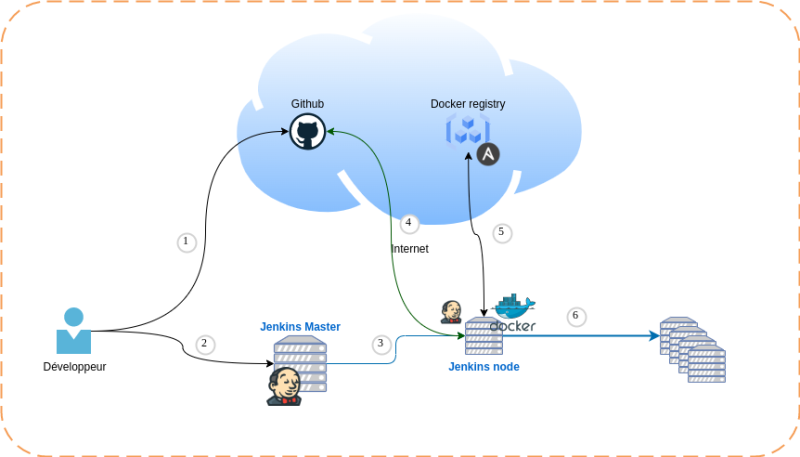
Implémentation
Step 1
Vérifier que docker est bien disponible sur notre serveur slave (Node Jenkins)
oot@node02:~# systemctl status docker
● docker.service - Docker Application Container Engine
     Loaded: loaded (/lib/systemd/system/docker.service; enabled; vendor preset: enabled)
     Active: active (running) since Fri 2022-01-21 13:12:28 UTC; 1h 4min ago
TriggeredBy: ● docker.socket
       Docs: https://docs.docker.com
   Main PID: 15998 (dockerd)
      Tasks: 9
     Memory: 116.7M
     CGroup: /system.slice/docker.service
             └─15998 /usr/bin/dockerd -H fd:// --containerd=/run/containerd/containerd.sock

Jan 21 13:12:28 node02 dockerd[15998]: time="2022-01-21T13:12:28.798179165Z" level=info msg="Docker daemon" commit=459d0df graphdriver(s)=overlay2 version=20.10.12
Jan 21 13:12:28 node02 dockerd[15998]: time="2022-01-21T13:12:28.814048009Z" level=info msg="Daemon has completed initialization"
Jan 21 13:12:28 node02 systemd[1]: Started Docker Application Container Engine.
Step 2
Utilisateur ansible managé par Jenkins.
On créer une clé ssh (Privé & public)
root@node02:~# ssh-keygen -t rsa -b 4096 -C "Jenkins OPS" -f jenkins.ops
Generating public/private rsa key pair.
Enter passphrase (empty for no passphrase):
Enter same passphrase again:
Your identification has been saved in jenkins.ops
Your public key has been saved in jenkins.ops.pub
The key fingerprint is:
SHA256:ZEKTf5gzlFlEIYirYE5vwVDOGnNwoWRay+ajoSBbdi8 Jenkins OPS
The key's randomart image is:
+---[RSA 4096]----+
| +o+..oo.*=.     |
|++*...o.+.       |
|.+*+ ..ooo       |
|.==o.  +* .      |
|Bo*.o   S+       |
|+B.= .           |
|+ . E .          |
|     .           |
|                 |
+----[SHA256]-----+
On intègre la clé privé dans la config de Jenkins
On créer le user “jenkins.ops” avec un mot de passe sur les serveurs à manager avec la configuration de la clé public.
# useradd jenkins.ops -m
# passwd jenkins.ops
On déploie la clé public sur les serveurs.
# ssh-copy-id -i jenkins.ops.pub jenkins.ops@<SERVEUR_MANAGED>
On attribut les droits “sudo” à l'utilisateur “jenkins.ops” sur les serveurs cibles.
jenkins.ops ALL=(ALL:ALL) NOPASSWD:ALL