
Introduction
Bitbucket est une solution de gestion de dépôt Git évolutive pour les entreprises, complètement intégrée à l'ensemble de la suite Atlassian.
Grâce à Bitbucket, vous accédez à de puissantes fonctionnalités pour la gestion des référentiels de code source, comme la configuration détaillée des autorisations et la collaboration autour du code, le tout en garantissant vos impératifs de sécurité.
Bitbucket offre des fonctionnalités très complètes de gestionnaire de code repository:
- pull requests: demandes de merge de code
- gestion des autorisations de branches
- paramètres projets factorisables
- moteur de recherche de code
- Stockage de fichiers volumineux Git (LFS)
- Pipelines (cloud only)
- intégration native Jira et Bamboo (CI / CD)
Plateforme supporté
Installation de Bitbucket
Pré-requis
Avant de déployer la solution Atlassian Bitbucket nous allons installer le package “git”
# apt install git
Increase limit - Augmenter les limits pour le user atlbitbucket
# nano /etc/security/limits.conf

atlbitbucket           soft    nofile          unlimited
atlbitbucket           hard    nofile          unlimited
https://confluence.atlassian.com/confkb/too-many-open-files-error-659784628.html
Déploiement du binaire
Pour le déploiement de Bitbucket, nous allons récupérer le binaire d'installation depuis le site d'Atlassian.
# wget https://www.atlassian.com/software/stash/downloads/binary/atlassian-bitbucket-6.9.0-x64.bin
--2019-12-24 16:27:44--  https://www.atlassian.com/software/stash/downloads/binary/atlassian-bitbucket-6.9.0-x64.bin
Résolution de www.atlassian.com (www.atlassian.com)… 18.184.99.151, 18.184.99.149, 18.184.99.150
Connexion à www.atlassian.com (www.atlassian.com)|18.184.99.151|:443… connecté.
requête HTTP transmise, en attente de la réponse… 301 Moved Permanently
Emplacement : https://product-downloads.atlassian.com/software/stash/downloads/atlassian-bitbucket-6.9.0-x64.bin [suivant]
--2019-12-24 16:27:44--  https://product-downloads.atlassian.com/software/stash/downloads/atlassian-bitbucket-6.9.0-x64.bin
Résolution de product-downloads.atlassian.com (product-downloads.atlassian.com)… 2600:9000:219c:d600:1f:ab86:b4a:17e1, 2600:9000:219c:1e00:1f:ab86:b4a:17e1, 2600:9000:219c:4200:1f:ab86:b4a:17e1, ...
Connexion à product-downloads.atlassian.com (product-downloads.atlassian.com)|2600:9000:219c:d600:1f:ab86:b4a:17e1|:443… connecté.
requête HTTP transmise, en attente de la réponse… 200 OK
Taille : 313276970 (299M) [application/octet-stream]
Sauvegarde en : « atlassian-bitbucket-6.9.0-x64.bin »

atlassian-bitbucket-6.9.0-x64.bin                 100%[==========================================================================================================>] 298,76M  2,94MB/s    ds 75s

2019-12-24 16:29:00 (3,97 MB/s) — « atlassian-bitbucket-6.9.0-x64.bin » sauvegardé [313276970/313276970]
Une fois le binaire récupéré, on modifie les droits sur celui-ci et on lance l'installation :
# chmod +x atlassian-bitbucket-6.9.0-x64.bin
# ./atlassian-bitbucket-6.9.0-x64.bin
Unpacking JRE ...
Starting Installer ...

Bitbucket 6.9.0 installation wizard
Would you like to install or upgrade an instance?
Install a new instance [1, Enter], Upgrade an existing instance [2]
1

Install Bitbucket 6.9.0
What type of instance are you looking to install?
Install a Server instance [1, Enter], Install a Data Center instance [2], Install a Smart Mirroring instance [3]
2
Where should Bitbucket be installed?

Select the folder where you would like Bitbucket 6.9.0 to be installed, then
click Next.
[/opt/atlassian/bitbucket/6.9.0]

Default location for Bitbucket home directory

The location for Bitbucket data.
This will be the default location for repositories, plugins, and other data.

Ensure that this location is not used by another Bitbucket installation.
[/var/atlassian/application-data/bitbucket]

Configure which ports Bitbucket will use.


Configure TCP Ports
Bitbucket requires a TCP port that isn't being used by other applications.

The HTTP port is where users access Bitbucket through their browsers.

Bitbucket also requires ports 7992 and 7993 are available to run an embedded
Elasticsearch instance that provides search functionality to Bitbucket.
HTTP Port Number
[7990]


Run as a service
For a production server we recommend that you run Bitbucket as a
Windows/Linux service because Bitbucket will restart automatically when the
computer restarts.
Install Bitbucket as a service?
Yes [y, Enter], No [n]
y
Please review your Bitbucket installation settings


Installation Summary
Installation Directory: /opt/atlassian/bitbucket/6.9.0
Home Directory: /var/atlassian/application-data/bitbucket
HTTP Port: 7990
Install as a service: Yes

Install [i, Enter], Exit [e]
i

Extracting files ...


Installation of Bitbucket is complete
Would you like to launch Bitbucket?
Yes [y, Enter], No [n]
y

Please wait a few moments while Bitbucket starts up.
Launching Bitbucket ...

This machine now has Bitbucket 6.9.0 Data Center installed
Your installation of Bitbucket 6.9.0 Data Center on this node is ready and
can be accessed from your browser.

For a complete Bitbucket 6.9.0 Data Center installation, you will need to
also install and connect to:

*  Shared database system
*  Shared file system
*  Shared Elasticsearch instance

Read more about installing Bitbucket Data Center.
Bitbucket 6.9.0 can be accessed at http://localhost:7990
Launch Bitbucket 6.9.0 in browser?
Yes [y, Enter], No [n]
n
Finishing installation ...
Déploiement MySQL Connector Java
Arrivé à cette étape, nous allons récupérer le mysql-connector-java depuis le site officiel MySQL pour pouvoir connecter notre plateforme Atlassian Jira Service Desk à la base de donnée AWS RDS MySQL
Ici on télécharge la dernière version stable à date (5.1.48)
# wget https://dev.mysql.com/get/Downloads/Connector-J/mysql-connector-java-5.1.48.tar.gz
On décompresser notre archive
# tar xvzf mysql-connector-java-5.1.48.tar.gz
On copie la “java lib” dans notre arborescence d'installation confluence (/var/atlassian/application-data/bitbucket/lib/)
# cp mysql-connector-java-5.1.48/mysql-connector-java-5.1.48.jar /var/atlassian/application-data/bitbucket/lib/
On relance Bitbucket et on continue le déploiement de la solution.
# atlbitbucket@debian:/opt/atlassian/bitbucket/6.9.0/bin$ ./stop-bitbucket.sh
# atlbitbucket@debian:/opt/atlassian/bitbucket/6.9.0/bin$ ./start-bitbucket.sh
Configuration Post-Install
Une fois Bitbucket installé, il faudra se rendre sur l'URL (http://IP_du_server:7990)
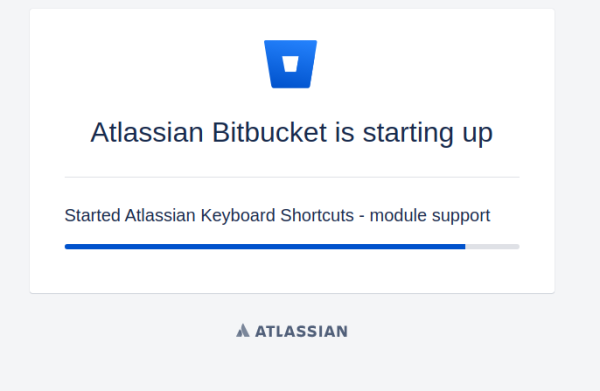
Si on se rend tout de suite sur l'interface web, on peut voir le chargement se faire.
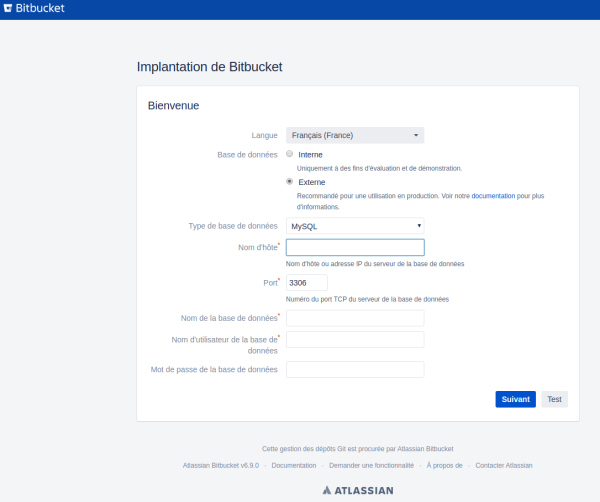
Renseigner les informations de connexion à la base de donnée. cliquez sur “Suivant”
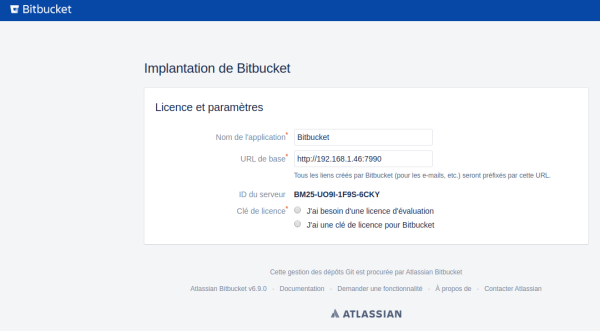
Choisissez l'option adéquate.
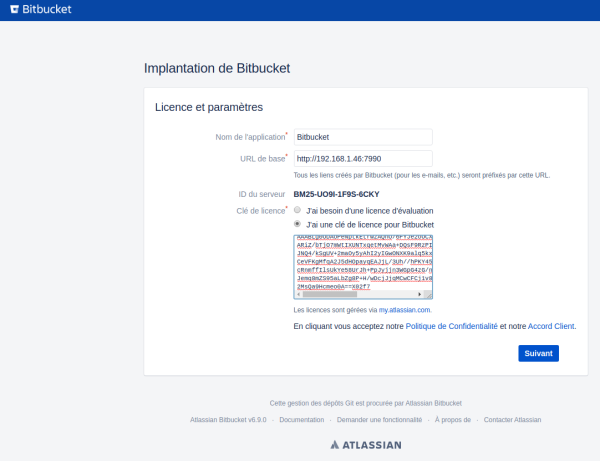
Entrer votre numéro de licence. cliquez sur “Next”
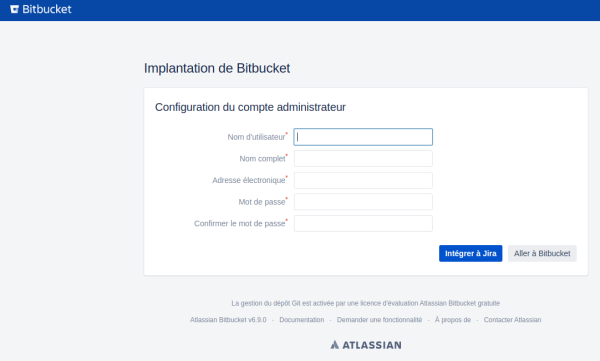
Nous allons créer le premier utilisateur de la plateforme confluence, celui-ci sera administrateur du produit. cliquez sur “Suivant”
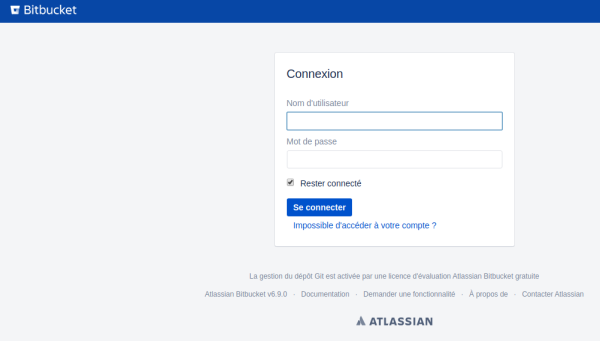
L'installation de notre plateforme Atlassian Bitbucket est terminée.
Configuration system
Modifier le umask
nano /opt/atlassian/bitbucket/6.9.0/bin/_start-webapp.sh
# Uncommenting the following will set the umask for the webapp. It can be used to override the default
# settings for the service user if they are not sufficiently secure.
#
umask 0027
Systemd
Nativement, lorsque l'on installe la plateforme bitbucket, nous ne disposons pas du service systemd. Nous allons mettre en place celui-ci rapidement.
Tout d'abord, nous allons arrêter le service.
atlbitbucket@debian:/opt/atlassian/bitbucket/6.9.0/bin$ ./stop-bitbucket.sh
Maintenant, nous allons créer une entrée pour systemd.
touch /lib/systemd/system/bitbucket.service
chmod 664 /lib/systemd/system/bitbucket.service
Éditer l'entrée.
vi /lib/systemd/system/bitbucket.service
Contenu du fichier “bitbucket.service”. Faire attention à l'emplacement ou se trouve le produit.
[Unit]
Description=Bitbucket
After=syslog.target network.target

[Service]
Type=forking
User=atlbitbucket
ExecStart=/opt/atlassian/bitbucket/6.9.0/bin/start-bitbucket.sh
ExecStop=/opt/atlassian/bitbucket/6.9.0/bin/stop-bitbucket.sh

[Install]
WantedBy=multi-user.target
On recharge systemd, active le démarrage automatique et on peut maintenant relancer le service via systemd.
systemctl daemon-reload
systemctl enable bitbucket.service
systemctl start bitbucket.service
systemctl status bitbucket.service
Reverse proxy sous Nginx
Nous allons déployer devant bitbucket un reverse-proxy sous nginx. Les certificats (SSL/TLS) du client seront portés par celui-ci.
Pour rappel, le serveur web nginx sera déployé sur la même instance hébergeant la solution Atlassian bitbucket.
Installation de nginx
On installe le package nginx
# apt install nginx
Configuration du vhost bitbucket
Nous allons également spécifier nos propres paramètres d'échange de clés Diffie-Hellman (DH).
# openssl dhparam -out /etc/nginx/dhparam.pem 2048
Création du virtualhost pour la solution Atlassian bitbucket
# nano /etc/nginx/sites-available/bitbucket

#------------------------------------------------------------------- COPY / PASTE
server {
    listen 80;
    server_name bitbucket.<DOMAIN>.org;
    root /space/www;

    access_log      /var/logs/nginx/confluence.access.log;
    error_log       /var/logs/nginx/confluence.errors.log;

    return 301 https://$host$request_uri;
}

server {
    listen 443;

    server_name bitbucket.<DOMAIN>.org;

    ssl on;

    ssl_prefer_server_ciphers on;
    ssl_protocols TLSv1.2;
    ssl_session_cache builtin:1000 shared:SSL:10m;
    ssl_ciphers EECDH+AESGCM:EDH+AESGCM;

    ssl_ecdh_curve secp384r1;
    ssl_session_timeout  10m;
    ssl_session_cache shared:SSL:10m;
    ssl_session_tickets off;
    ssl_stapling on;
    ssl_stapling_verify on;

    ssl_dhparam /etc/nginx/dhparam.pem;

    ssl_certificate /etc/ssl/private/rdc.pem;
    ssl_certificate_key /etc/ssl/private/rdc.key;

    add_header Strict-Transport-Security "max-age=63072000; includeSubDomains; preload";
    add_header X-Content-Type-Options nosniff;
    add_header X-XSS-Protection "1; mode=block";

    access_log      /var/logs/nginx/bitbucket.access.log;
    error_log       /var/logs/nginx/bitbucket.errors.log;


    location / {
	proxy_pass http://localhost:7990;
	proxy_set_header X-Forwarded-Host $host;
	proxy_set_header X-Forwarded-Server $host;
	proxy_set_header X-Forwarded-For $proxy_add_x_forwarded_for;
	proxy_set_header X-Real-IP $remote_addr;
	proxy_redirect off;
    }


}
On créer le lien pour activer le vhost
# cd /etc/nginx/sites-enabled/
# ln -s /etc/nginx/sites-available/bitbucket
On vérifie la configuration
# nginx -t
nginx: the configuration file /etc/nginx/nginx.conf syntax is ok
nginx: configuration file /etc/nginx/nginx.conf test is successful
On redémarre nginx
# systemctl restart nginx
Reconfiguration de Bitbucket
Une fois notre reverse proxy sous nginx déployé, il faudra reparamétrer bitbucket.
On arrête le service bitbucket
# systemctl stop bitbucket
Editer le fichier “bitbucket.properties”
# nano /var/atlassian/application-data/bitbucket/shared/bitbucket.properties
Ajouter le paragraphe suivant :
server.port=7990
server.secure=true
server.scheme=https
server.proxy-port=443
server.proxy-name=bitbucket.<DOMAIN>.org
On démarre le service bitbucket
# systemctl start bitbucket
Allocation mémoire
Par défaut, la configuration de bitbucket (JVM) est la suivante : “Xms=521Mo Xmx=1Go”. Il peut être nécessaire d'augmenter les ressources mémoire pour que le produit soit plus fluide.
Éditer le fichier “_start-webapp.sh” et augmenter les valeurs “JVM_MINIMUM_MEMORY” et “JVM_MAXIMUM_MEMORY”
# nano /opt/atlassian/bitbucket/6.9.0/bin/_start-webapp.sh
Exemple pour allouer 4go de RAM.
- Remplacer :
if [ -z "${JVM_MINIMUM_MEMORY}" ]; then
    JVM_MINIMUM_MEMORY=512m
fi
if [ -z "${JVM_MAXIMUM_MEMORY}" ]; then
    JVM_MAXIMUM_MEMORY=1g
fi
- Par
if [ -z "${JVM_MINIMUM_MEMORY}" ]; then
    JVM_MINIMUM_MEMORY=2g
fi
if [ -z "${JVM_MAXIMUM_MEMORY}" ]; then
    JVM_MAXIMUM_MEMORY=4g
fi
Upgrade
La procédure qui va suivre va nous permettre de mettre à jour notre plateforme bitbucket de la version 6.9.0 à la version 6.9.1.
Après avoir télécharger la dernière version (V. 6.9.1 à date), nous allons rendre le binaire exécutable.
[root@localhost ~]# chmod +x atlassian-bitbucket-6.9.1-x64.bin
On arrête notre instance bitbucet
root@debian:~# systemctl stop bitbucket
On lance le binaire bitbucket comme suit :
# ./atlassian-bitbucket-6.9.1-x64.bin
Unpacking JRE ...
Starting Installer ...

Bitbucket 6.9.1 installation wizard
Would you like to install or upgrade an instance?
Install a new instance [1, Enter], Upgrade an existing instance [2]
2

Upgrade Bitbucket 6.9.1
What type of instance are you looking to upgrade?
Upgrade an existing Server instance [1, Enter], Upgrade an existing Data Center instance [2], Upgrade an existing Smart Mirroring instance [3]
1
Where should Bitbucket be installed?

Select the folder where you would like Bitbucket 6.9.1 to be installed, then
click Next.
[/opt/atlassian/bitbucket/6.9.1]

Default location for Bitbucket home directory

The location for Bitbucket data.
Please provide the location of your existing home directory, where your
repositories, plugins, and other data are stored.

Be sure to STOP your current instance and create a backup before proceeding.
[/var/atlassian/application-data/bitbucket]

Please review your Bitbucket installation settings


Installation Summary
Installation Directory: /opt/atlassian/bitbucket/6.9.1
Home Directory: /var/atlassian/application-data/bitbucket
Upgrade existing service: Yes

Install [i, Enter], Exit [e]
i

Extracting files ...


Installation of Bitbucket is complete
Would you like to launch Bitbucket?
Yes [y, Enter], No [n]
y

Please wait a few moments while Bitbucket starts up.
Launching Bitbucket ...

Installation of Bitbucket 6.9.1 is complete
Your installation of Bitbucket 6.9.1 is now ready and can be accessed via
your browser.
Bitbucket 6.9.1 can be accessed at http://localhost:7990
Launch Bitbucket 6.9.1 in browser?
Yes [y, Enter], No [n]
n
Finishing installation ...
Attention:
Il faudra penser à restauré les configuration après la mise à jour de la plateforme (Mémoire, Proxy, etc…)
Il faudra aussi mettre à jour le PATH dans le service systemd : bitbucket
Une fois l'installation (Upgrade) de la plateforme terminée, lorsque vous vous rendrez sur la page bitbucket, vous pourrez vous rendre compte dans le bas de page de la version de bitbucket, soit la version 6.9.1.
Annexe
https://confluence.atlassian.com/bitbucketserver/install-bitbucket-server-on-linux-868976991.html
https://confluence.atlassian.com/bitbucketserver/bitbucket-server-installation-guide-867338382.html
https://confluence.atlassian.com/bitbucketserver/bitbucket-server-home-directory-776640890.html
https://confluence.atlassian.com/bitbucketserver/scaling-bitbucket-server-776640073.html